
Wireless translation earbuds make it easier to follow conversations across languages in situations like travel check-ins, rideshares, classrooms, and international calls. The most important differences come down to how translation is triggered, the quality of microphones in noisy places, device compatibility, and whether the earbuds rely on a phone app and internet connection. This guide breaks down what to expect, what to look for, and how to set them up for smoother everyday use. For more guidance, see Paekole AI Translation Earbuds,Over Ear Bone Conduction ….
Translation earbuds are built to support spoken conversation—not replace fluency. They typically capture speech through the earbuds’ microphones, send it to a companion app, then play the translated audio back through the earbuds. For further reading, see Paekole Translation Earbuds – Official Website.
Wireless connectivity matters here too: stable Bluetooth pairing and low dropouts help keep the conversation moving. For background on Bluetooth standards and interoperability, see the Bluetooth Core Specification (Bluetooth SIG).
Most translation earbuds and apps offer a few ways to run a conversation. Choosing the right mode can improve accuracy and reduce frustration.
If you’ve ever used a phone-based translator, the earbuds experience is similar—just more hands-free. App ecosystems vary; for example, translation tools and settings commonly referenced in help documentation can be found at the Google Translate Help Center.
Spec sheets often highlight “number of languages,” but real-world usability is usually decided by a handful of practical details.
| Feature | Why it matters | What to look for |
|---|---|---|
| Conversation control | Prevents missed phrases and accidental listening | Tap-to-translate or push-to-talk option |
| Noise handling | Boosts accuracy in cafés, stations, and streets | Dual mics and noise reduction features |
| Latency | Keeps exchanges natural | Short, consistent delay during back-and-forth |
| Battery | Avoids mid-trip shutdowns | Earbud + case total time and fast recharge |
| App support | Enables languages and modes | Clear setup, frequent updates, stable pairing |
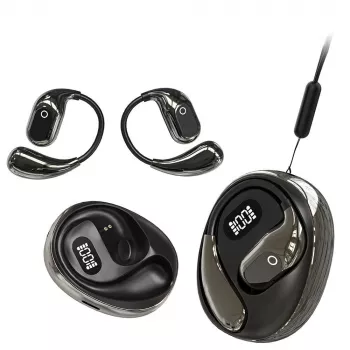
If you want a compact option for everyday language help, Wireless Translation Earbuds are designed for portable, on-the-go translation assistance paired with a compatible smartphone. They’re most useful for short exchanges—asking for directions, confirming reservation details, or following a quick instruction at work or school.
| Item | Details |
|---|---|
| Product | Wireless Translation Earbuds |
| Price | 14.51 USD |
| Availability | In stock |
| Product page | https://coolgemcorner.shop/wireless-translation-earbuds/ |
For work and study setups, pairing a translation workflow with a bigger screen can make multilingual meetings and language-learning materials easier to follow. A separate display like the 24 Inch FHD 1080p Computer Monitor with 75Hz Refresh Rate and AMD FreeSync can be handy for keeping a transcript, notes, or lesson content visible while you listen through earbuds.
A good first setup reduces dropouts, mismatched languages, and “why can’t they hear me?” moments.
Most translation earbuds rely on a smartphone app for language selection, conversation modes, and processing. Some may offer limited functionality without a phone, but higher-quality translation often depends on the app and may require an internet connection.
Noise can reduce microphone pickup quality and lower translation accuracy. Using push-to-talk, speaking closer, facing the speaker, pausing between sentences, and stepping to a quieter spot when possible can noticeably improve results.
They’re best for everyday communication, travel, and casual workplace or study situations. For medical, legal, or high-stakes business conversations, a professional interpreter is the safer choice.










Leave a comment