Cozy Fireplace TV Stand Dresser: 5 Fabric Drawers
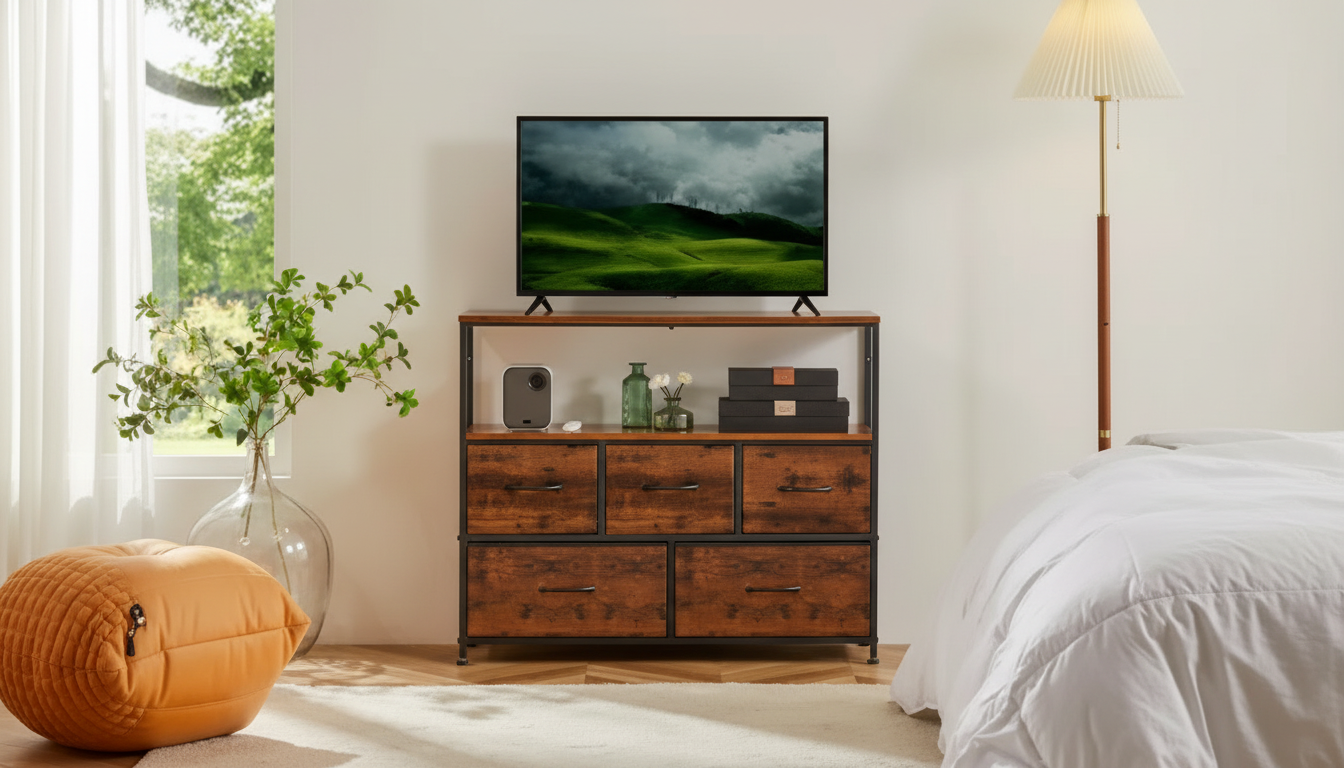
Fireplace TV Stand Dresser with 5 Fabric Drawers: Storage, Display, and a Cozy Focal Point
A single piece that combines media storage, dresser-style organization, and a fireplace-style focal point can simplify small-space living. This design blends concealed fabric-drawer storage with open display areas, helping keep cords, remotes, and everyday items out of sight while maintaining a clean look around the TV. For a streamlined setup, pair the room’s visual centerpiece with practical storage that’s easy to use day to day—especially when you want the space to look “done” even between tidy-ups.
If you’re shopping for an all-in-one solution, start with the Fireplace TV Stand Dresser with 5 Fabric Drawers – Storage & Display Cabinet, then build your viewing setup around it with essentials like the 24 Inch FHD 1080p Computer Monitor with 75Hz Refresh Rate and AMD FreeSync for a compact office/entertainment corner.
What This Piece Adds to a Room
- Combines the visual presence of a fireplace-style console with the practicality of a dresser and display cabinet.
- Five fabric drawers create quick, quiet storage for items that look cluttered when left on shelves.
- Top surface supports a TV setup while keeping media accessories within reach.
- Open areas can be styled with baskets, books, speakers, plants, or decor for a balanced look.
In many living rooms (and nearly all apartments), the TV wall becomes the default focal point. A fireplace-style console helps “anchor” that wall so it feels intentional, while the drawer-and-shelf mix prevents the all-too-common pileup of controllers, chargers, and loose cords. The result is a setup that looks more like furniture and less like a tech staging area.
Storage and Display: Practical Ways to Use the 5 Fabric Drawers
- Group items by routine: one drawer for remotes and batteries, one for gaming accessories, one for chargers and cables.
- Use a “guest-ready” drawer for quick cleanups (coasters, matches/lighters for candles, napkins, small tools).
- Place bulky soft items in drawers: throws, controller grips, headphones, or pet accessories.
- Keep display areas intentional: use 2–3 larger objects rather than many small ones to avoid visual clutter.
| Room | What to store in fabric drawers | What to display | Placement tip |
|---|---|---|---|
| Living room | Remotes, batteries, HDMI cables, game controllers | Books, framed photos, speakers | Leave breathing space around vents and power strips |
| Bedroom | Socks, accessories, skincare extras, chargers | Clock, small lamp, decor trays | Route cables behind the unit to keep the floor clear |
| Apartment/Studio | Work items, paperwork, tech pouches | Baskets, plants, minimal decor | Use drawer labels to keep multi-use storage organized |
| Guest room | Linens, toiletries, spare cords | Welcome note, small basket | Keep one drawer empty for visitor use |
A simple “category map” makes the drawers feel bigger than they are. Once you decide what lives where, resets are faster: toss items into the right drawer, close, and the room looks calm again. If you want an even cleaner look, store duplicates (extra cables, backup batteries, spare streaming remotes) in the back drawers and keep daily-use items in the most accessible ones.
Fireplace-Style Console Considerations
- Confirm the heating function (if included) is appropriate for the room size and ventilation needs.
- Keep flammable items and textiles away from any heat outlet area; avoid blocking airflow with decor.
- Plan an outlet location: use a properly rated wall outlet and avoid overloading power strips.
- If the fireplace feature is primarily for ambiance, prioritize placement and cable management for a clean front view.
Whether the fireplace feature is mainly visual or includes heat, safety and airflow come first. Follow common heating-safety guidance such as keeping combustibles away from heat sources and maintaining clear space for ventilation. For general best practices, see the NFPA heating safety resources and the U.S. Consumer Product Safety Commission guidance on space heaters.
Size, Placement, and Cable Management
- Measure the TV width and base/leg span, plus clearance for soundbars or center speakers.
- Leave space behind the unit for plug access and to prevent cable pinching.
- Use adhesive cord clips or a cable sleeve to bundle power and HDMI lines into one tidy run.
- If placing in a corner, ensure doors/drawers still open smoothly and drawers can fully extend.
A clean setup is mostly planning. Before placing the stand, identify where power will come from and how cables will travel. A practical approach is to bundle cords into one “spine” down the back using clips, then keep a little service slack (an extra loop) so you can swap devices without yanking connections loose. If you’re running a smaller screen for work or gaming, a compact display like the 24 Inch FHD 1080p Computer Monitor with 75Hz Refresh Rate and AMD FreeSync can help reduce footprint while still looking sharp on top of a dresser-style console.
Styling Tips for a Warmer, Less Cluttered Look
Assembly and Maintenance Basics
Good Fits: Who This Works Best For
FAQ
Can a TV sit on a fireplace-style stand safely?
Yes, as long as you follow the manufacturer’s clearance and ventilation requirements, keep heat outlets unobstructed, and ensure the TV isn’t exposed to direct heat. Use a properly rated wall outlet, avoid overloading power strips, and keep cords routed so they don’t rest against warm surfaces.
What should be stored in fabric drawers versus open shelves?
Use fabric drawers for items that create visual clutter—cables, remotes, chargers, small accessories, and soft goods like throws or headphones. Keep open shelves for larger decor, baskets, or daily-use items, and limit the number of small objects to maintain a clean look.
How can cords be kept neat behind a TV stand?
Bundle cables with cord clips or a sleeve, label ends so swaps are quick, and keep power and signal cables grouped separately when possible. Leave a small amount of slack behind devices so you can move components without tugging on connections.







Leave a comment